Category Archives: social media

Poll: To at or not to at?

Today, while other people are out enjoying the warm sunshine, I’ve been sat at my computer, grappling with one of life’s big issues:

at symbol @

When we link to somone’s Twitter profile, should we include the liquorice allsort charcter, the “@” symbol, in the link, or not?

In other words, should my profile be linked to as:

@pigsonthewing

or as:

@pigsonthewing

What do you think? Have your say below (using the WP-Polls plugin for WordPress, which coincidentally I’m trialling); and please ask your friends to do so, too.

[poll=2]

Thank you.

HashMash: My invention of a new hashtag search tool

Yesterday, while reading through the for last Monday’s superb Twicket event (for background, read the , which I wrote), I started to notice that other hashtags had been used in tweets discussing it. I started to wonder which had been used the most, and what subjects they were about, and this gave me an idea, which I posted to Twitter:

Sadly, my coding days were so long ago that I no longer have the technical skills to make that happen.
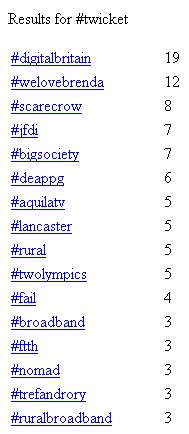
Top tag is #digitalbritain, followed by #welovebrenda

Tags tweeted alongside #twicket

Then Rachel Beer () kindly retweeted my comment, and one of her followers, Simon Painter (), immediately responded that it was was something he could do. That evening, he already had a first daft up-and-running, and the tool, which I named “HashMash”, is now available for public use at . He’s done a superb job, it works just how I imagined it would. (Nonetheless, Simon tells me that he plans to make a jquery version and beautify it).

He kindly credited Rachel and me in the footer, so I recoded the footer to include links, and “tag” , and popped my amendments to Simon’s markup onto the very useful PasteBin website, which has syntax highlighting.

Just one minute later, Simon had uploaded my new markup.

Footer includes links to Andy Mabbett's and Rachel Beer's websites and Twitter accounts

The revised HashMash footer

Bearing in mind that Simon and I have never met, had never corresponded, and weren’t even following each other on Twitter until this happened, this has been a first-class example of the power of social media, and the JFDI approach to getting stuff done. In many large organisations, the first meeting about a project initiation document wouldn’t even be scheduled.

Why not ? Let me know what you think.

Simon and Rachel: Thank you. I owe you both a beer!

Footnote: Simon has the best Twitter disclaimer ever.

Update: Simon has written a .

Update 2: Following design changes, my “footer” markup is now at the top of the page!

My name is Andy Mabbett, and I’m a Hyperlocal blogger

Recently, I’ve been increasingly interested in the phenomenon of ‘hyperlocal’ blogging: blogs about a particular area or locality (or, in one of my favourite and rather extreme cases, a single square metre).

Some fantastic work has been done by my friends at Talk About Local, whose site will tell you all you could ever need to know about about hyperlocal blogs.

For a long time, I’ve been contributing to the debate about how hyperlocal blogs might evolve, for example organising events such as the Hyperlocal Govcamp West Midlands (aka ) unconference, the first such event to introduce hyperlocal bloggers to local government web folk and other public sector people. I’ve also attended others, like the excellent TAL11 in Cardiff. I’ve also taught hyperlocal bloggers to use WordPress and other tools, at Social Media Surgeries. My hyperlocal activity even pre-dates blogging — I was the instigator and founder of the Usenet discussion newsgroup uk.local.birmingham, in 1998.

Having talked the talk for so long, I’ve finally decided to walk the walk, and am now a contributor to my local blog, The B44 (B44 is the postcode for where I live, covering parts of the Great Barr and Kingstanding parts of north Birmingham).

My first post there is on the subject of . That and future posts will appear under the “My comment elsewhere” section of this blog.

I’m grateful to the site’s founder, , for the opportunity to participate.

Fixing Facebook’s Microformats (at their request)

Twitter, and the wider ‘blogosphere’, have been alive tonight (UK time), with people commenting on, or mostly simply repeating, the news that Facebook have implemented the on all their events, making them parsable by machines and thus easy to add to desktop or on-line calendars. They’ve also included for venue details.

This is generally a good thing, but what most people — at least some of whom should have known better — failed to notice was that the implementation is broken.

Consider this event, a concert by my friends’ band, Treebeard:

which, as you can see, is on 18 February from 19:00–22:00 (7–10pm).

That’s encoded, in the Facebook page’s mark-up, as:

<span class=”dtstart”><span class=”value-title” title=”2011-02-18T19:00:00-08:00“> </span>19:00</span> – <span class=”dtend”><span class=”value-title” title=”2011-02-18T22:00:00-08:00“> </span>22:00</span>

The “-08:00” at the end of each date-time value represents a timezone 8 hours behind UTC (as we must now call Greenwich Mean Time) — that would be correct were the event in California, or elsewhere in the Pacific Time Zone; but for the UK, the mark-up translates to 3-6am.

Since the event is in the UK, the start time should be encoded as “2011-02-18T19:00:00+00:00“, which puts it in the correct UTC timezone (in British Summer Time, it would be “2011-02-18T19:00:00+01:00“). Ditto for the end time.

The same will apply for events in any other timezone on the planet, each with an appropriate adjustment.

I’ve already alerted Facebook developer Paul Tarjan to the problem, and this is my response to his requests for assistance in fixing it.

Do you make comments on others’ blogs? Bookmark and share them!

You may notice (on the right hand side of this site, if you use the default view; or see image below), a list headed “My comments elsewhere”, with links to other people’s blog posts, on which I’ve recently commented.

List of the five last posts on which I commented, each linked to the post concerned

Screen shot of my recent comments, at the time of writing

I’ve been asked how I do this.

Every time I comment on a blog post — and I try to do so often, both to show my interest in others’ work, and to be part of their conversations — I bookmark that post on the site Delicious Pinboard, and tag it “comment”.

I then pass the RSS feed of all my bookmarks with that tag: http://feeds.pinboard.in/rss/u:pigsonthewing/t:comment/ to WordPress (the software I use to author and host this blog), which magically displays a list of the most recent five, as you can see.

The full feed is, of course, also available to anyone who wishes to subscribe to it in the feed reader of their choice; and my tagged comments can also be read as a web page.

In this way, as well as telling my readers what I’ve done, I bring extra attention to the blogs I comment on, thereby helping, albeit in a small way, their authors.

Why not bookmark your comments, and put a feed of them on your own blog?

Update: Delicious became awful when it relaunched, I now use Pinboard.

Update: You can also use this technique to add the list of your comments (specifically, the relevant URL on the bookmarking site) as a “work”, in your profile page on services which list your publications, such as ORCID.

This weekend was indistinguishable from magic

Today, I updated someone else’s website, with one button-press on my Nokia N95 mobile phone.

The button-press was all that was need, using the lovely Dabr web interface for Twitter, to favourite a tweet about an excellent event I attended yesterday, UK GovCamp 2011.

That tweet contained a URL, and a .

Packrati.us monitors the tweets I favourite, as well as everything I tweet or re-tweet, for both links and hashtags, and saves the URLs, duly tagged, to Delicious.

Delicious then produces an RSS feed for (as they do with every tag).

Steph Gray (@lesteph) has done an excellent job, using Commentariat2 and WordPress to make the conversation aggregator (a “buzz” page) for UK GovCamp 2011, and has kindly accepted my suggestion to include the Delicious RSS feed for the event’s hashtag.

And so the link in the tweet I favourited appeared on the “buzz” page of the UK GovCamp 2011 website.

All because I made a single button-press on a device little bigger than a matchbox.

To quote the already over-quoted Arthur C Clarke‘s ‘Third Law‘:

Any sufficiently advanced technology is indistinguishable from magic

Thirty-five years after I first (at a very youthful age!) used a computer, and seventeen years after I first used the web, I’m still excited by them. I wonder where they’ll take us next?

The event was indistinguishable from magic, too. The links above will show you why.

A proposed tag for including Wikipedia links in Twitter posts

I’ve had another idea!

I saw Matthew Somerville () tweet:

Reading about http://en.wikipedia.org/wiki/Clothianidin and bees

and it occurred to me, both that a fantastically high number of Wikipedia links are tweeted, and that Wikipedia URLs are relatively long. This latter fact might have been significant, if Matthew had needed to say a few more words, or was talking about something with a longer name. He could have shortened his link, using, say, Bit.ly, but then he’d have had to repeat the stem:

Reading about Clothianidin http://bit.ly/dE6pUf and bees

which is hardly shorter, and disrupts the flow.

What if we agreed a special tag, say W# or w:, used like this:

Reading about w:Clothianidin and bees

and Twitter clients automatically swapped that for a Wikipedia link:

Reading about Clothianidin and bees

Update

Twitter clients could allow users to set their preferred language-version of Wikipedia, and perhaps find the relevant translations of articles (which Wikipedia could better facilitate, using rel=alternate headers), authors could also specify a language, such as w:fr:brie or w:de:München

Proposal: generate KML from postcodes in Twitter messages

Here’s an idea I’ve just had, and mentioned on Twitter:

It would be cool if someone with the necessary skills and bandwidth could provide a service which takes a Twitter search (say, for a hashtag), extracts from it , or postcode districts (the first half of a postcode, such as “B44”), and returns a corresponding KML file, which can then be passed to other services, like Google Maps.

It would enable anybody to create a service like Ben Marsh‘s excellent #UKSnow map, but on the fly, and for any term or hash-tag; and especially for one-off or short term issues. Imagine, for instance, the . I could post on Twitter, say:

I just saw a #ShootingStar in B6!

(I did, too!) and others might reply:

I saw #ShootingStar from Waverley Station, EH1 1BB

Good view of #ShootingStar in S9, too!

and we’d very quickly have a map of places from which it had been seen — in the event, such information was posted to Twitter, but there was no easy way to collate it.

A similar service, returning KML for geo-coded tweets, would also be useful, and internationally too, and something combining both might also work.

A task for an upcoming hackday, perhaps? Or one you might like to tackle…

Don’t confuse your social media channels

Earlier today, Birmingham‘s O2 Academy (a large popular music concert venue, m’lud) posted this to Twitter:

Tuesday’s giveaway….Black Rebel Motorcycle club CD’s to give away! Just head over to the competitions tab for more information!

Unfortunately Twitter doesn’t have a “competitions tab”, and neither do the various Twitter clients that people use.

As you can see from the suffix I’ve highlighted in the screenshot, “via Facebook”, the tweet they posted was actually a Facebook status update. It turns out that their Facebook page has such a tab, and the Academy have simply piped their Facebook statuses into Twitter, without thinking about, or remembering, what they’ve done.

A salutary lesson to be careful about feeding content from one forum to another; and about writing for a specific context. Failure to do so can give confusing messages, and is not helpful to your audience